KITAQ SERIES • REFERENCE EDITION
KITAQ SERIES
Programming and user manuals
Source snapshot: September 14, 2026 · English edition: September 14, 2026
Native compiler verification
Native builds and executable checks passed on Windows, Linux, macOS ARM and macOS Intel. KITAQGB passed 48 tests and 395 helper checks per platform; KITAQFC passed 55 tests and 401 helper checks. Rust 1.85 was also tested. PUBLIC_DISTRIBUTION.json records the installed binary hashes and validation provenance. The public GitHub Actions workflows rebuild and test this source independently.
Frozen reference outputs test ROM bytes, diagnostics and helper formats. Earlier C# emulator evidence remains historical evidence with its original source fingerprints. It does not automatically prove every Rust API, real hardware or complete FDS BIOS/game startup. The unavailable original PNG conversion script was reconstructed from its specification; byte parity with that missing script cannot be claimed.
Welcome
KITAQGB began as a fork of NORCAL, the NES C compiler associated with Zachtronics. It develops that foundation into a C-family compiler for Game Boy and Game Boy Color, with code generation, memory, video, audio and ROM banking adapted to those machines. We acknowledge the original project and its author, Keith Holman.
NORCAL takes its name from Northern California. Inspired by this geographical naming, the author named KITAQGB after Kitakyushu, the city where they were born and raised. KITAQ + GB combines Game Boy with KITAQ, the nickname of Kitakyushu in Fukuoka Prefecture, Japan: 北九 (キタキュー, Kitakyū). Pronounce KITAQ as kee-tah-KYOO, IPA /ˌkiːtɑːˈkjuː/. The final Q sounds like the English letter Q. Read KITAQGB as kee-tah-KYOO jee bee, pronouncing G and B separately.
The name KITAQGB has two meanings. Kernel-Informed Toolchain for AI-Quality Game Boy Development expresses the goal of a toolchain that understands its target machine and supports both human programmers and generative AI.
The other meaning is Kids' Imagination Transformed into Actual Quests in Game Boy Forests: a tool that turns children’s imagination into real adventures in the forests of Game Boy. It expresses the creative wish to turn small ideas, sketches and AI-assisted prototypes into adventures people can actually play.
NORCAL was developed in connection with the NES version of HACK*MATCH. See the author's introductions to NORCAL: A C Compiler for the NES and HACK*MATCH for the NES. The project history and name explanation follow the README supplied by the author.
How to use these manuals
Like an early computer manual, this collection starts with short programs you can type, build and run. You can learn the machinery after seeing the result; you do not need to memorize every term first.
- Start with the first program in Volume 1 for GB or Volume 4 for FC.
- Use Volume 2 or Volume 5 to add input, graphics and sound.
- Observe execution with KOKURA or KUROSAKI, then organize diagnostics with SARAKURA.
- Search the volume or its API dictionary when you already know a function name.
Language syntax, compiler intrinsics, library functions and command-line operations are separate kinds of reference entries. The compiler volumes also contain CPU instruction indexes. Similar GB and FC names do not guarantee identical arguments or behavior.
The seven volumes
| Volume | Input | Output or purpose |
|---|---|---|
| KITAQGB | C source and assets | GB/CGB ROMs, maps and build information |
| KITAQGB library | Calls from game code | Graphics, sound, input, communication and game services |
| KOKURA | GB/CGB ROMs | Execution, pictures, audio, state and observations |
| KITAQFC | C source and CHR assets | NES/FDS output and build information |
| KITAQFC library | Calls from game code | NES graphics, sound and device services |
| KUROSAKI | NES/FDS images | Execution, recording and analysis |
| SARAKURA | Build information and diagnostic events | Reports, repair plans and retest plans |
The supplied font
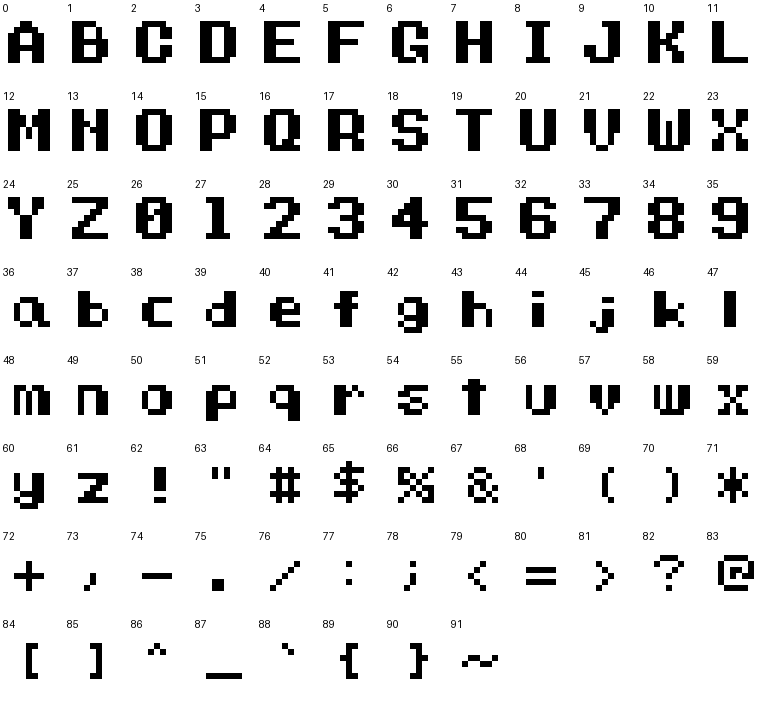
The 26 uppercase letters, 10 digits, 26 lowercase letters and 30 symbols come from the author’s ascii.c. All 92 glyph shapes are preserved in the tile atlas. Space uses an empty tile; backslash and the vertical bar are not included in this font and display as blanks. gb_font.c and fc_font.c display the complete set.
Edition and verification
This edition describes the source snapshot of September 14, 2026. The reference inventory records source and executable hashes. Consult the verification records for the inputs, conditions and scope of each test.
A successful build means a ROM was produced. An execution check means an emulator advanced through the specified frames. Pixel comparisons, input behavior and sound checks are recorded separately. This is not a guarantee of compatibility with every peripheral or physical console; warnings remain visible in the logs.
The current public source release excludes KOKURA GUI frontends, KUROSAKI GUI and PLITA. Use the published cores, CLIs and integration APIs now.
Prepare a working directory
Examples use Windows PowerShell. Save C files as UTF-8 text. The current directory is the folder in which you run a command. Quote paths containing spaces and invoke an executable with & "path" when needed. Clone the repositories as siblings, following GitHub setup, and run cross-project commands from their parent folder.
# リポジトリのルートで実行します。
New-Item -ItemType Directory -Force out | Out-Null
.\kitaqgb\kitaqgb.exe --help
.\kitaqfc\kitaqfc.exe --help
Replace game.c, game.gb and game.nes with your filenames. Angle brackets such as <ROM> mark placeholders; do not type the brackets. Commands are generally presented on one line. Bash's backslash line continuation is not PowerShell syntax.
Compiler fixes used by this edition
Building the examples exposed a KITAQGB internal local-label collision and KITAQFC problems preserving intermediate values and return values across calls. The recorded manual checks used the corrected compilers, including the GB object-pool example and FC functions and structures. These fixes do not establish support for every C construct. Consult each example's verification record.
Read, print and publish the HTML
Open index.html from the downloaded folder to read offline. Styles, search, examples and verification pictures use local files; no external CDN is required. Keep the directory together rather than copying individual HTML files. The print button produces a layout without the navigation column.
The kitaq-docs repository holds the manual website. GitHub normally displays HTML source in the repository browser; GitHub Pages serves the rendered website. See the repository README for publication and checkout instructions. This English edition contains the same seven volumes, API entries, sample programs and verification references as the Japanese edition. Original source excerpts and recorded tool output retain their original wording where translation would obscure the exact source or command response.